Map The Worksheet
A laser cutting cost calculation formula is only useful when the worksheet and the calculator share the same field list. Keep the Excel sheet, PDF worksheet, and web quote workflow aligned so a second estimator can see which number moved the price.
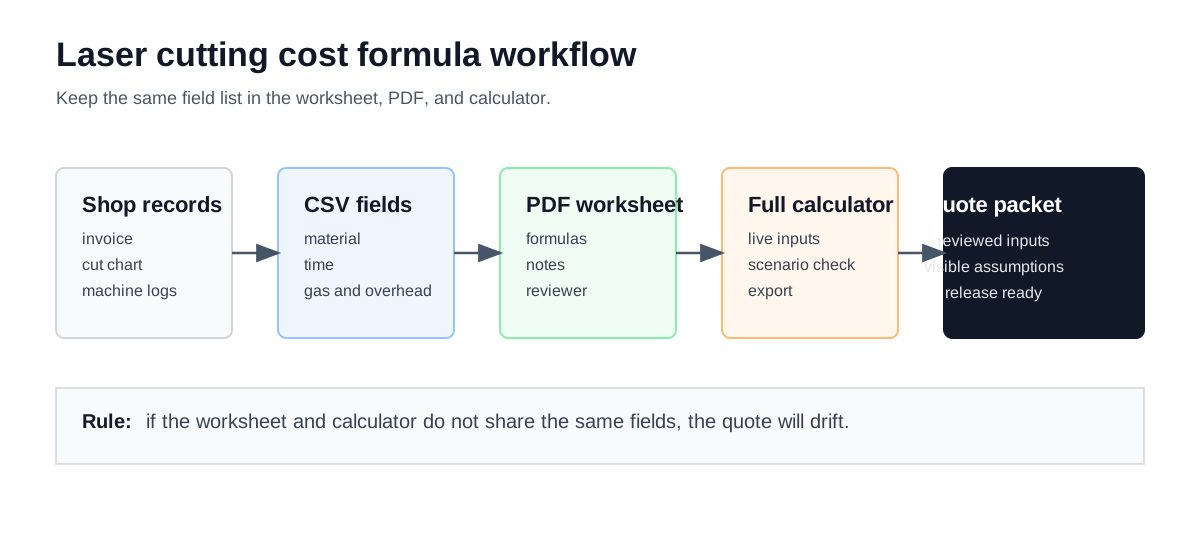
Keep one field list across the worksheet, PDF, and calculator so the quote packet uses the same reviewed assumptions.
Formula Ledger
Use the same sequence every time:
| Step | Formula basis | Data to replace with shop values |
|---|---|---|
| Material cost | part area or volume x density x material price / utilization | material, thickness, quantity, utilization, scrap assumptions |
| Cutting time | cut length / effective cutting speed | cut length, material, thickness, power, assist gas, quality target |
| Pierce and setup time | (pierce count x seconds per pierce) + setup minutes | pierce count, pierce strategy, batch size, setup/changeover record |
| Process cost | total hours x shop hourly rate + gas + power + maintenance | hourly rate, electricity rate, gas flow, maintenance categories |
| Quote price | (direct cost + allocated overhead) / (1 - target margin) | overhead allocator, margin policy, quote risk review |
Excel And PDF Field Contract
The laser cutting cost calculation formula in excel and the laser cutting cost calculation formula in excel pdf should carry the same field contract. The worksheet can be edited offline, but it should not invent a second naming system that breaks the calculator review.
| Field group | Worksheet fields | Calculator match | Evidence gate |
|---|---|---|---|
| Job identity | part name, drawing revision, quote quantity, due date | Quote packet context before calculation | The worksheet points to the same revision the shop is quoting. |
| Material basis | material, thickness, sheet cost, sheet size, yield rule, scrap note | Material and nesting inputs in the full calculator | Supplier invoice, approved remnant record, or reviewed planning placeholder. |
| Geometry and time | cut length, pierce count, cutting speed, pierce seconds, setup minutes | Cutting time, pierce time, and setup lines | CAM export, drawing review, controller log, or timed sample cut. |
| Machine cost | shop hourly rate, productive-hour basis, labor treatment | Hourly-rate input carried into the quote | The rate definition explains whether energy, gas, maintenance, and overhead are inside it. |
| Direct adders | assist gas, energy, finishing, packaging, outside process, expedite review | Separate quote lines when they are not already inside the rate | Each adder has a source and a destination so it is not counted twice. |
| Release record | reviewer, approval date, margin policy, source notes | Export notes and quote packet review | The formula result is not released until the source notes travel with it. |
Use the laser cutting calculation guide when the question is the quote sequence. Use this formula page when the work is field mapping for Excel, PDF, or training. Use the full laser cutting calculator when the same fields are ready to calculate, compare, and export.
Worked Packet
Use one packet to test the formula before you quote.
| Packet line | Example case | Reviewer check |
|---|---|---|
| Sheet cost | invoice-backed material basis | The sheet price comes from the same supplier record as the quote. |
| Cut length | 1260 mm from CAM export | The drawing revision and CAM file match. |
| Pierce count | 16 internal pierces | The same pierce count appears in the part review. |
| Setup | 10 min with 2 min first-article check | Setup is amortized over the same batch size. |
| Shop rate | hourly cost floor from the cost-center model | The rate already includes the cost categories it is meant to include. |
| Margin | shop pricing policy | Margin is applied after the cost floor is visible. |
material_per_part = sheet_cost / good_parts
process_cost = machine_minutes / 60 x hourly_rate
price_before_margin = material_per_part + process_cost + overhead_per_part + direct_adders
price_per_part = price_before_margin / (1 - margin)
Review Card
The worksheet is still a review artifact until every row points to a source and a release approver.
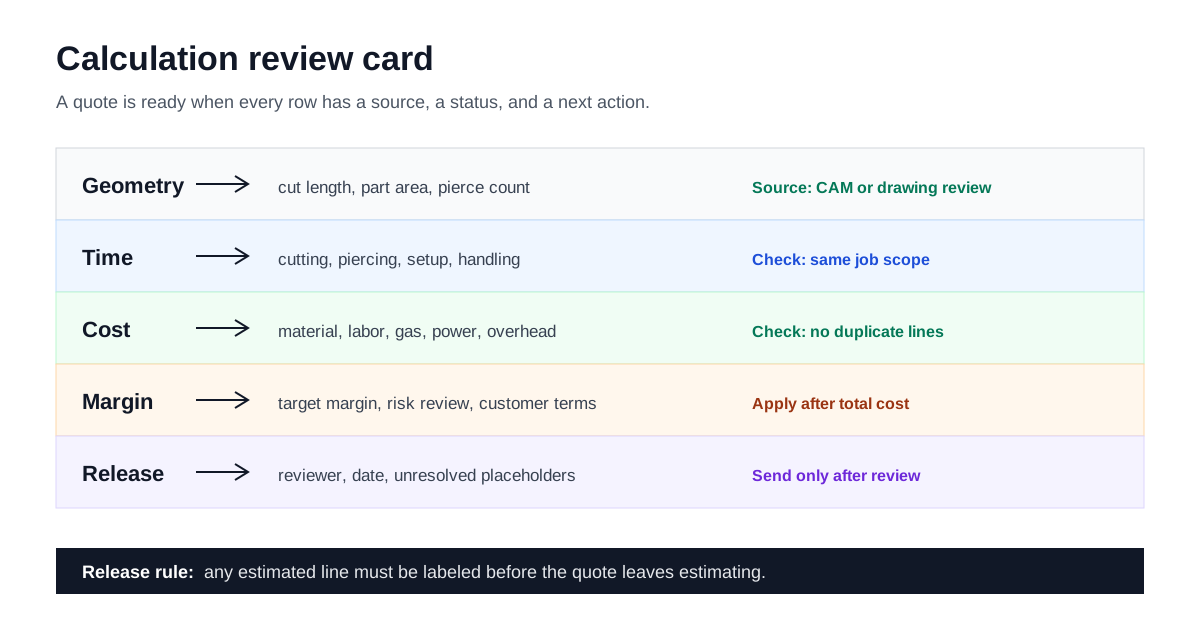
The review card keeps geometry, time, cost, margin, and release status visible in one pass.
What Belongs Where
The worksheet is a field map, not a release decision.
| Belongs in worksheet | Why it stays there | Moves to price release when |
|---|---|---|
| material, cut length, pierce count, setup minutes | They explain the quote inputs. | The drawing revision and CAM file are already verified. |
| hourly rate, gas, power, maintenance | They carry the cost floor. | The cost-center reviewer has signed off on the assumptions. |
| allocated overhead and margin | They belong to pricing policy. | The quote reviewer is ready to release the number. |
| CSV and PDF worksheet files | They preserve the field list and review record. | The same field list is still used in the live calculator. |
Review Checks
Before a number leaves the desk, confirm:
- The drawing revision matches the packet.
- The batch quantity matches the setup allocation.
- Yield and scrap policy are documented.
- The hourly rate does not double count gas, power, or overhead.
- Margin is applied after the cost floor is visible.
Quick Checks
Use the quick tools when the worksheet needs a second look before release:
Source Boundary
LaserCalc Pro can compute the unit price and show the stack, but it cannot certify pricing policy or commercial risk. Use completed jobs, supplier invoices, machine logs, and internal review notes before treating the number as quote-ready. Review the shared methodology when the worksheet needs a source boundary.
Next Step
Review the hourly rate guide, the scrap allowance and yield policy, and the full laser cutting calculator before release.