Define Kerf As A Measured Setup Record
Kerf width is the width of material removed by the laser cut. For quoting, the useful value is not a public average or a copied chart. It is the measured result for a specific material, thickness, nozzle, focus, assist gas, cut chart, machine condition, CAM compensation state, and inspection method.
Use this page when a kerf value needs to move from a chart, memory, or planning matrix into a quote record. The guide explains measurement and quote transfer. The kerf lookup calculator remains the matrix/tool surface, and material utilization remains the nesting tool.
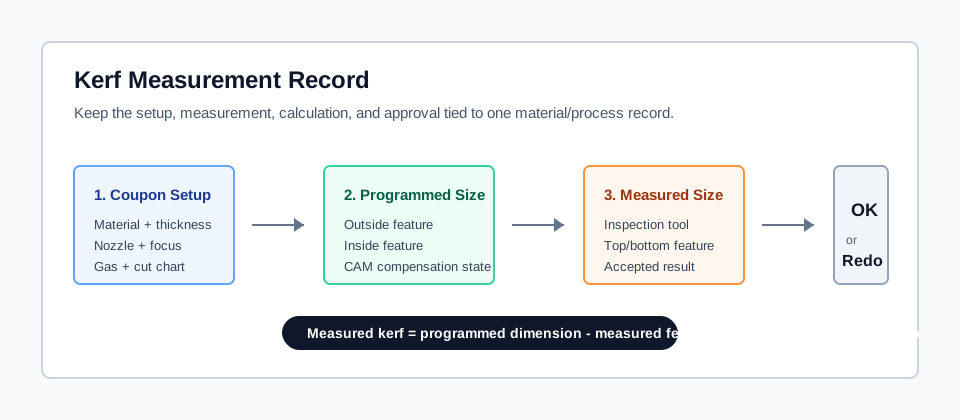
A kerf record is useful only when the setup, programmed dimension, measured dimension, and approval state are kept together.
Record The Setup Before The Number
Use a kerf value only with the setup that produced it.
| Record line | What to capture | Quote risk if missing |
|---|---|---|
| Material and thickness | Grade, thickness, supplier lot when relevant, drawing revision, and job traveler. | A kerf value from one stock condition is reused on another. |
| Nozzle, lens, and focus | Nozzle size, lens state, focus position, alignment record, and service date when relevant. | Hardware or optics changes silently move the cut width. |
| Assist gas setup | Gas type, purity requirement, pressure or flow record, and cut-chart setup. | Oxygen, nitrogen, and air setups share one offset without proof. |
| Programmed dimensions | Outside feature, inside feature, CAM compensation state, and lead-in strategy. | The measurement cannot be traced back to the intended geometry. |
| Measured dimensions | Inspection tool, outside result, inside result, top/bottom result if taper matters, and approval. | A value becomes a quote assumption without a first-article check. |
Measure Both Outside And Inside Features
Kerf measurement is a comparison between the programmed feature and the finished feature. The exact calculation depends on the coupon geometry and compensation state, so the record should show both dimensions instead of only storing a final number.
Use this measurement sequence:
- Cut a coupon with the same material, thickness, nozzle, gas, focus, speed, power, and quality requirement planned for the quote.
- Record whether CAM compensation was disabled, controlled, or already active.
- Measure outside and inside features separately.
- Record the inspection tool and whether top, bottom, or average feature size is being used.
- Approve the kerf value only for the matching setup record.
Small holes, slots, bridges, and tight-fit features deserve their own inside-feature check. An outside profile can pass while a small inside feature still needs a different lead-in, pierce routine, compensation value, or quote warning.
Confirm The CAM Offset Meaning
CAM systems do not all store kerf in the same way. Some workflows store full kerf width and let the software apply the half-offset. Others store a direct offset value, a side-specific compensation value, or a material-table correction. The estimator should know which field is being used before the value becomes a quote assumption.
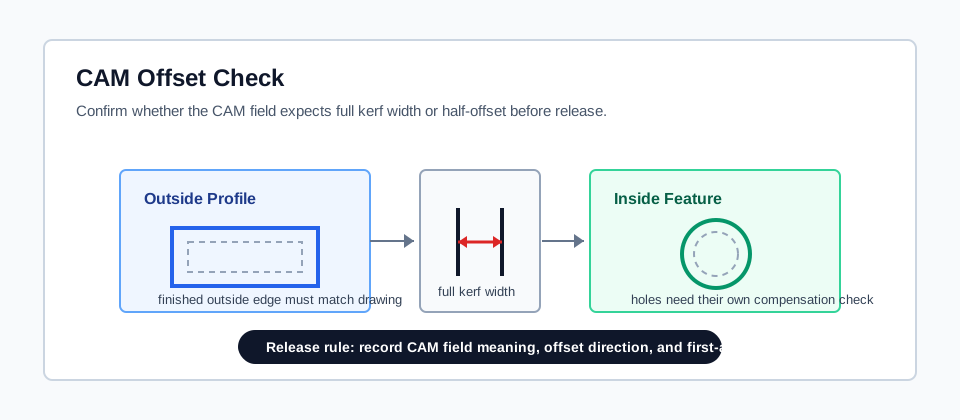
CAM release needs three fields together: what the kerf field means, which direction the offset moves, and what the first article measured.
Keep these fields in the CAM record:
- material table name, revision, and approval date;
- whether the field stores full kerf width or half-offset;
- inside and outside compensation behavior;
- first-article result that proves the row is ready for quoting;
- reason for retest when material, gas, nozzle, focus, or quality requirement changes.
Connect Kerf To Nesting And Material Cost
Kerf affects nesting, material yield, small-feature risk, and quote assumptions. It should not be treated as a decorative tolerance note.
| Quote area | How kerf changes it | Where to carry the record |
|---|---|---|
| Nesting spacing | Part spacing must account for the removed cut width and quality requirement. | Material utilization calculator |
| Sheet count | Kerf and spacing can change whether a batch fits on the planned sheet count. | Nesting file review |
| Small features | Slots, holes, bridges, and narrow walls may require separate review. | Laser quote workflow |
| Material loss | Measured kerf can become a material-loss input when the shop policy uses it. | Kerf lookup and loss check |
Trace Removed Material
Most quotes do not need to price kerf loss as a separate line. When a shop policy does track the removed strip, keep the math tied to the same measured setup record instead of using a generic kerf chart.
| Check | Working line | Use only when |
|---|---|---|
| Linear area loss | kerf width x cutting length | The quote needs a simple sheet-area loss estimate. |
| Volume loss | kerf width x cutting length x material thickness | The shop tracks removed volume for material or scrap review. |
| Mass loss | volume loss x material density | The quote policy prices loss by weight or reconciles sheet yield by mass. |
| CAM offset check | measured kerf / 2 | The CAM field expects a radius or half-offset, not full kerf width. |
The offset line is a software-field check, not a universal rule. If the CAM table already expects full kerf width, entering half the value will move the part the wrong amount.
Retest Before Reuse
Retest kerf when the setup changes enough to make the old record weak:
- material grade, thickness, coating, or supplier lot changes;
- nozzle, lens, focus, or optics condition changes;
- assist gas type, purity, pressure, or flow setup changes;
- cut chart, speed, power, lead-in, or pierce routine changes;
- tolerance, fit, small-feature, or inspection requirement changes;
- the job is a repeat order but the machine or CAM material table has changed since the last approval.
Do not reuse a public kerf chart for tight-tolerance, customer-facing, or repeat-production quotes. Use public or internal matrix values only as planning placeholders until a measured record exists.
Move The Kerf Record Into The Quote
Use the kerf lookup calculator for a starting matrix input, then replace the matrix value with a measured kerf record when the quote depends on it. Carry the approved value into material utilization, nesting review, and the full laser cutting calculator.